Scheduling & Dispatch

Handyman Scheduling Software
Fill Every Van's Day Without Crossing Town Twice

Handyman days are hard to plan: a full-day list here, three quick repairs there, a gutter cleaning that depends on the weather and a property manager who needs a vacant unit done by Friday. HandymanBossPro puts every waiting job on a live map, lets you build each van's day in one step, sets the route order and texts customers so somebody is home.

Start Your 14-Day Free TrialTry the Live Demo
No credit card required  ·  14-day free trial  ·  from $59/mo after
1 Step
From Map to Van
$59
Plans Start Per Month
Auto
Route Order From the Shop
14 Days
Free Trial, No Card
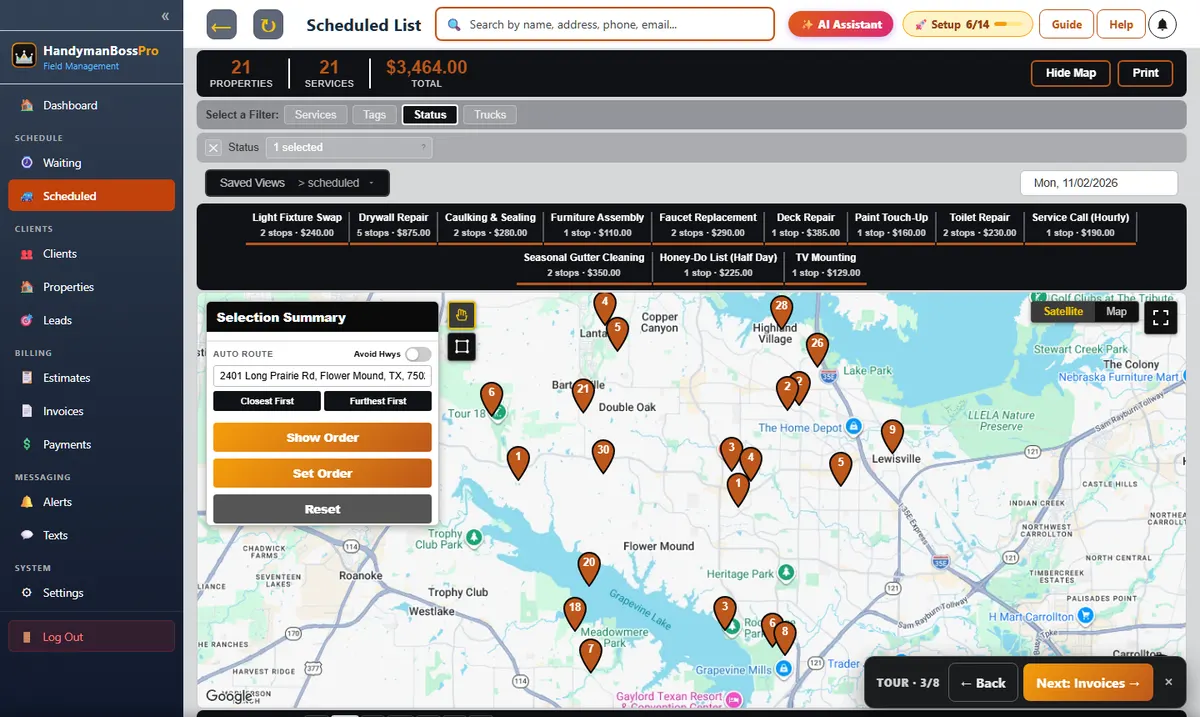
HandymanBossPro waiting list map with handyman jobs colored by due date and the dispatch board by van

Scheduling Built Around Small Jobs.
Group Them, Route Them, Text Them.

The money in handyman work is in fitting more small jobs into a day. That only happens when you can see them on a map and drop them on a van in the right order.

🗺️

Waiting List Map

Every job waiting for a day as a pin, colored not due, due now and overdue.

⭕

Circle to Assign

Draw around a neighborhood, pick a van and a day, done.

🚐

Dispatch Board

Each van's jobs by day, with the anchor job and the small ones around it.

🔀

Auto-Routing

Set the order by hand or let it route closest first from the shop.

💬

Automatic Texts

Night-before, on-the-way and arrived, chosen by the customer.

🛰️

Crew GPS

See every van on the office map when a same-day call comes in.

One Big Job, Then the Small Ones Around It

Most good handyman days are built around an anchor: a full-day honey-do list or a deck repair. The map shows the small jobs near it, and the board shows the day in order.

  • Half-day and full-day visits next to quick repairs
  • Route order on the board matches the tech's phone
  • Skips come back with the tech's note
  • Seasonal gutter cleanings come due on their own
  • Saved views for each van
Example Dispatch Board, Thursday
Van 1 · 8:00
Full-day honey-do · Flower Mound
Anchor
Van 2 · 8:00
Faucet swap · Lewisville
1
Van 2 · 9:30
TV mount · Lewisville
2
Van 2 · 11:00
Door adjustment · Highland Village
3
Illustration of what you see from your own records.

How a Handyman Day Gets Built

The same routine every afternoon for tomorrow.

01

Look at the Map

See what's waiting, what's due and what's overdue, by neighborhood.

02

Place the Anchor Jobs

Put the half-day and full-day visits on a van first.

03

Fill Around Them

Circle the small jobs nearby and drop them on the same van.

04

Route and Text

Set the order, and the night-before texts go out on their own.

A Calendar App Doesn't Know Where Anything Is

Calendars show time. Handyman scheduling is about time and place.

A calendar shows you're free Thursday afternoon. It doesn't show you that the faucet job is 25 minutes from the morning job, or that two waiting jobs are on the same street as Thursday's deck repair.

So vans cross town twice, small jobs wait for weeks, and the customer who just needs a towel bar re-anchored calls somebody else.

A map-based waiting list fixes that. You see the work where it is, and you build days that make sense on the road.

Handyman Scheduling Features

Everything here exists to fit more jobs into a day with less driving.

📋

Waiting List

Counts by service and a live map of every waiting job.

🎨

Due Colors

Not due yet, due now, overdue past a 7-day grace.

🔁

Recurring by Days

Gutters at 180 days, checkups at 365, landlords at 30.

🚐

Vans and Days

Assign by van, see each van's day in order.

🔀

Route Order

Drag to reorder or auto-route from the shop.

⏭️

Skips

Skipped jobs come back with the tech's reason.

❌

Cancellation Reasons

Track why jobs get canceled.

🗓️

Arrival Windows

Call-ahead and arrival window notes on the job.

💬

Customer Texts

Night-before, on-the-way and arrived alerts.

🗺️

Customer Live Map

Customers see where they are in today's route.

🛰️

Crew GPS

Vans on the office map.

🤝

Meetings Add-On

Booking links and reminders for estimate visits.

Customers Know When You're Coming

Most handyman jobs need someone home. Automatic texts and a live map in the customer app tell them when to expect you, so the door is open and the dog is put away.

  • Night-before reminders
  • On-the-way and arrived texts
  • Customer chooses their alerts
  • Live route map in the customer app
  • Replies go to the office inbox
Example Customer Texts
Night before
Your handyman visit is tomorrow. Please have your list ready.
On the way
Brody is on the way, about 15 minutes out.
Arrived
Brody has arrived.
Illustration of what you see from your own records.

Simple Plans. Never Billed Per User.

Pick the plan that fits your business. Every plan starts with a 14-day free trial and no credit card.

Compare plans on the pricing page.

Handyman Scheduling: Common Questions

Can I schedule half-day and full-day visits?

Yes. Half-day and full-day honey-do lists are services like any other, so they sit on the board next to quick repairs and you can see how full each van's day is.

How does auto-routing work?

Pick a van and a day and auto-route it closest first from your shop, or drag the jobs into the order you want. The tech's phone shows the same order.

What about jobs that repeat, like gutter cleaning?

Recurring services are set by the minimum days between visits, such as 180 for gutters or 365 for a yearly checkup. Each address comes back onto the waiting list when it's due.

What happens when a customer isn't home?

The tech taps Skip and adds why. The office sees it, texts the customer and puts the job on another day.

Scheduling is one part of running a handyman business in HandymanBossPro. See all features or go back to the handyman software overview.

Handyman Scheduling Guides

Building days, routing, half-day and full-day visits, weather, rush seasons, skips, texts and choosing a scheduling system.

  1. Handyman Scheduling Software: The Complete Guide to Building Better Days
  2. Half-Day and Full-Day Handyman Visits: How to Schedule Them
  3. Scheduling Hourly Handyman Service Calls Without Losing the Day
  4. The Handyman Dispatch Board: Every Van, Every Day, in Order
  5. Route Order for Handymen: Why the Sequence of Stops Matters
  6. Auto-Routing for Handyman Vans: When It Helps and When to Override It
  7. Scheduling Handyman Jobs by Neighborhood: The Circle Method
  8. Not Due, Due Now, Overdue: Reading the Handyman Waiting List
  9. Scheduling Handyman Jobs That Need Parts First
  10. Scheduling Multi-Day Handyman Projects Without Blocking the Board
  11. Two-Person Handyman Jobs: Scheduling the Helper
  12. Scheduling Around Customer Availability: Windows, Call-Ahead and Keys
  13. Rain Days: Rescheduling Outdoor Handyman Work Without Chaos
  14. Same-Day and Urgent Handyman Calls: Fitting Them In
  15. Skips and Reschedules: Handling Handyman Jobs That Don't Happen
  16. The Spring Rush: Scheduling a Handyman Business Through Busy Season
  17. The Holiday Rush: TV Mounts, Guest Rooms and Last-Minute Lists
  18. Scheduling Rental Turnovers and Make-Readies for Landlords
  19. Scheduling Seasonal Gutter Cleanings That Come Due on Their Own
  20. Scheduling Estimate Visits Without Losing Billable Time
  21. Crew GPS for Handyman Companies: Knowing Where Every Van Is
  22. The Night-Before Text: The Most Useful Message a Handyman Sends
  23. On-the-Way and Arrived Texts for Handymen
  24. The Customer's Live Map: "You're Stop 4 of 6"
  25. Booking Links for Handyman Estimate Visits
  26. Saved Views: Each Dispatcher's Own Version of the Board
  27. Tracking Why Handyman Jobs Get Canceled
  28. Buffer Time Between Handyman Jobs: How Much Is Enough
  29. Choosing Handyman Scheduling Software: What to Check

Stop Driving Across Town
for a Towel Bar.

A live map of waiting jobs, a dispatch board by van, auto-routing and automatic texts. Try HandymanBossPro free for 14 days.

Start Your 14-Day Free TrialTry the Live Demo
No credit card required  ·  14-day free trial  ·  from $59/mo after