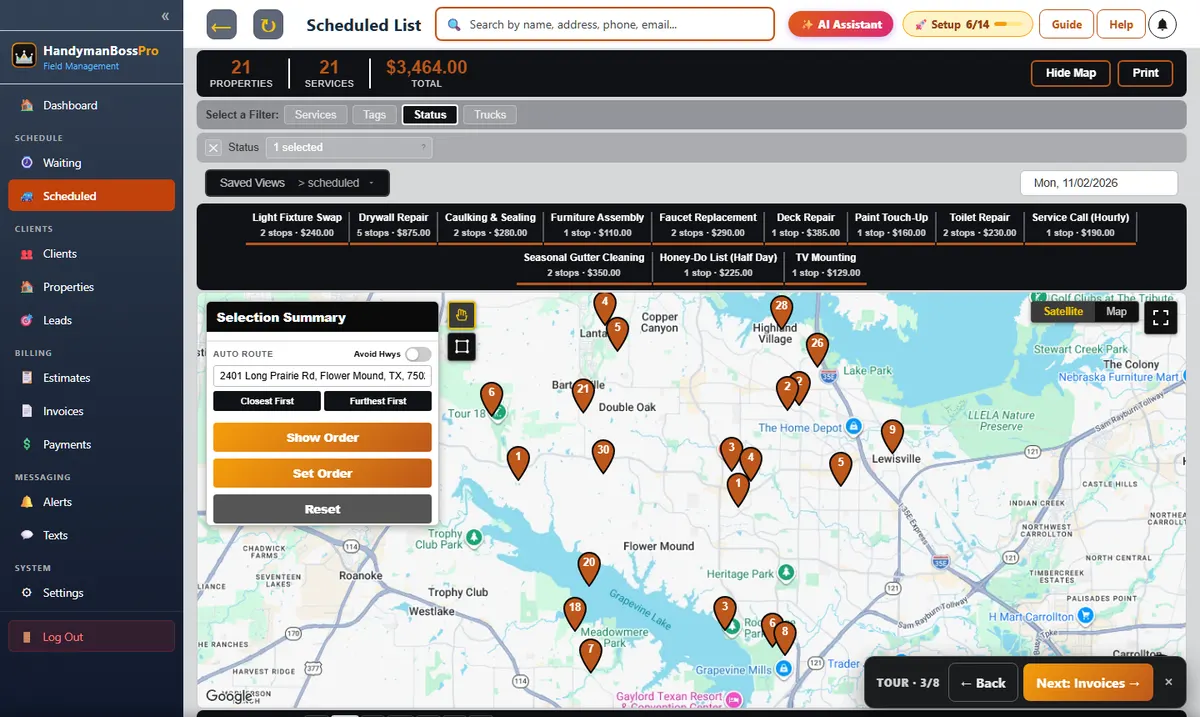
A handyman day is a dozen small jobs that each need their own list, their own parts and their own invoice. HandymanBossPro keeps the customer's task list on the job, puts every job waiting for a day on a live map, builds each van's route, lets the tech tick off tasks and log hours and materials on the phone, and charges the card on file when the work is done.
Generic field software treats every job like one task with one price. A handyman visit is a list: hang three pictures, fix the sticking door, patch the hallway, swap the fan. HandymanBossPro is set up for that from the first screen.
The customer's honey-do list rides on the job and shows on the tech's phone, so nobody reads it off a text thread.
Techs log hours on site, materials used and what they cost, so hourly jobs bill right and you know what each visit took.
Photos of every repair saved with the job, ready for the homeowner, the landlord or your own records.
Every job waiting for a day is a pin on the map. Circle a neighborhood and put it on a van in one step.
Night-before reminders, on-the-way and arrived texts go out on their own, so customers are home and ready.
Completing the job creates the invoice and can charge the card on file before the van leaves.
Each job carries the customer's list, the items saved on the house and the access notes. The tech ticks off each task, logs the hours and materials, takes the photos and taps Complete.
The same four steps for a single repair, a full-day honey-do list or a property manager's make-ready.
Build an estimate from your service list, send it by text or email, and let the customer approve it online.
Approved work lands on the Waiting List map. Seasonal work comes due on its own.
Assign stops to a van, set the order by hand or auto-route, and the tech's phone shows the same order.
The tech ticks off the tasks, logs hours and materials, adds photos and completes. The invoice goes out and the card is charged.
Most handymen start with a phone, a notebook and a calendar app. It works until it doesn't.
The list lives in a text thread with the customer. The parts are on a receipt in the truck. The hours are a guess at the end of the day, and the invoice goes out on Sunday night if it goes out at all.
The moment you add a second truck or a helper, the notebook stops working. Somebody shows up without the list, somebody forgets the anchors, and the customer gets two different stories about when you are coming.
HandymanBossPro keeps the list, the house, the hours, the materials and the money on the job, so whoever goes out has the same information you do.
Everything here exists to get more small jobs done in a day and billed the same day.
Every job waiting for a day, colored not due yet, due now and overdue.
Jobs by van and by day, with route order and auto-routing.
The customer's list on the job and on the tech's phone.
Logged by the tech on each job for hourly billing and job history.
What went into the job and what it cost, saved with the visit.
Water heater, fans, faucets, toilets, doors, locks, deck, fence and gutters with brand, size and room.
Saved with the job and visible to the office.
Built from your service list, approved online, turned into jobs in one click.
Created on completion, with card on file, online pay and past-due follow-ups.
Many addresses under one client and one monthly statement.
Gutter cleanings and yearly checkups come due on their own.
Customers see their visits, pay invoices and request work.
The dashboard shows what is waiting, what is scheduled by van, who is where on the map and what got paid. No switching between a calendar, a notes app and a payment app.
Pick the plan that fits your business. Every plan starts with a 14-day free trial and no credit card.
Compare plans on the pricing page.
It runs on the same platform as the other BossPro apps, set up for handyman work: task lists on jobs, hours and materials on the checklist, items on the house like fans, faucets, doors and gutters, a handyman starter service list and a Handyman Job Report.
Yes. Set up an hourly service call in your service list. The tech logs the hours on site on the job, so the office has the real hours in front of it when the invoice goes out.
No. The tech app runs in the browser on iPhone and Android and installs to the home screen. Techs log in with your company login and a personal PIN.
Start is $59/month, Pro is $89/month and Crew is $199/month. You are never billed per user, and every plan starts with a 14-day free trial with no credit card.
Yes. Import a CSV of customers and addresses. Imported addresses are placed on the map automatically.
This page is the overview. Each of the guides below goes deeper on one part of running a handyman business with software. See all features or go back to the handyman software overview.
Task lists, hours and materials, photos, the waiting list, texts, payments, imports and choosing a system.
Task lists, routes, hours, materials, photos, estimates and invoices in one place. Try HandymanBossPro free for 14 days.